


Key Takeaways
- Explainer videos simplify complex products, services, or ideas through short, engaging visual storytelling.
- Businesses use explainer videos to improve engagement, increase conversions, strengthen brand recall, and explain offerings faster than text alone.
- Different explainer video styles serve different purposes, including animated, whiteboard, live-action, and product explainer videos.
- Animated explainer videos work best for software and abstract concepts, while live-action videos build stronger emotional connection and trust.
- A strong explainer video script should focus on customer pain points, use simple conversational language, and end with a clear CTA.
- Explainer videos perform best when strategically placed on homepages, product pages, landing pages, email campaigns, and social media channels.
Introduction
Most modern consumers have short attention spans. As such, businesses that explain clearly what they do and why it matters have a major advantage.
Videos fill this void by making information more engaging and memorable than text alone. Thereby, enabling prospects to quickly move from confusion to clarity and genuine interest.
Particularly, explainer videos build trust and professionalism. They also give brands a consistent way to pitch across sales and marketing channels. Additionally, they can be easily repurposed for ads, email campaigns, social media, and investor or internal presentations.
This article explains what explainer videos are and their different formats. You'll also learn when to use them and what exactly makes them work.
I'll clean up this HTML according to all your rules:What Is an Explainer Video?
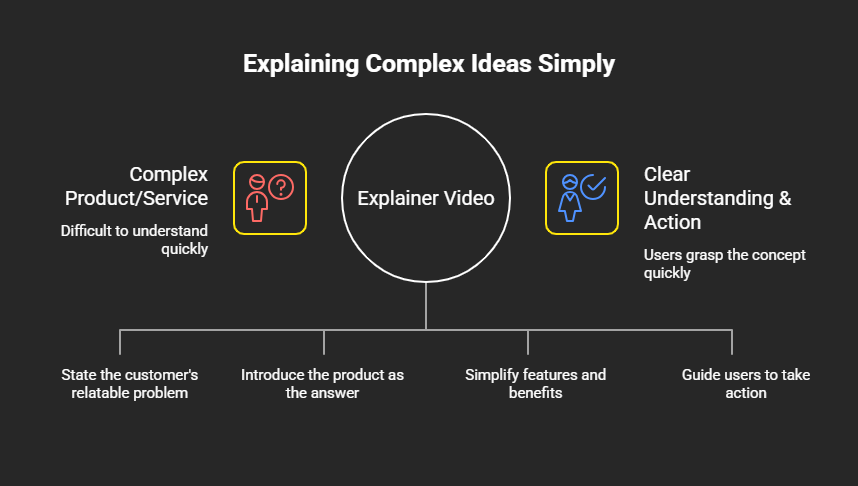
An explainer video is essentially a short, focused video that clearly explains a complex product, service, or idea. It usually combines simple visuals, on‑screen text, and a voiceover.
In fact, most explainer videos are around 30 seconds to 2 minutes long. As such, they act like a modern "elevator pitch", quickly helping people decide if something is relevant to them.
What Does an Explainer Video Usually Include?
Explainer videos seek to make information easier to understand and remember than text alone. Here is what they often constitute:
- Problem: What relatable problem does the customer have? What makes their life hard?
- Solution: What's the answer to their problem? Why is the suggested product a better way?
- Product or service explanation: How does the suggested solution work? What makes it valuable—key features and benefits—at a very simple, non-technical level.
- CTA (Call-to-Action): Tell them what to do next. "Sign up now." "Download our guide." "Book a demo." This turns understanding into concrete action.

Why Businesses Use Explainer Videos?
Businesses employ explainer videos for different reasons, such as:
- Simplify complex ideas: Some products, like software, are complicated. Explaining them with words takes forever. An explainer video can do so in 90 secs.
- Improve engagement: Nowadays, people watch videos more than they read. A video keeps people on your website or business page longer.
- Increase conversions: A good explainer video makes people want to buy. Visitors who watch videos are more likely to convert. More conversions mean more sales.
- Build brand recall: People remember videos better than text. This consequently strengthens brand recall and increases the chances they'll return.
Read more: How video content strengthens brand identity, and Why high-quality video is essential in modern web design.
What Are the Different Types of Explainer Videos?
Modern businesses deploy different types of explainer videos—depending on what they sell and how they want to communicate. Each style has its own strengths and weaknesses. Let's unpack some, shall we?
Animated Explainer Video
Animated explainers utilise illustration, motion graphics, and icons to tell a story.
They are ideal for software, SaaS, tech, and abstract concepts to visualise things that don't exist physically. For instance, workflows, data flows, or "before vs after" states.
Whiteboard Explainer Video
Whiteboard explainers typically involve someone drawing and writing on a whiteboard while a narrator explains. They work best for educational and process-driven explanations. The idea is often to break down steps, frameworks, or concepts in a clean, classroom-style way.
Live-Action Explainer Video
Live-action explainers leverage real people, real locations, and real products. They are the best for personal branding and human connection. They often show founders, teams, or customers on camera to build trust, authenticity, and emotional rapport.
Product Explainer Video
Product explainers focus closely on a specific product. They unpack what it looks like, how it works, and how to utilise it. They're best for showcasing product features and use cases, especially around product launches and demos.
Read more: Video content for product launches.
What Is the Difference Between an Explainer Video and a Corporate Video?
Explainer videos and corporate videos play different roles in a marketing ecosystem. Let's break down the distinctions:
- Purpose and goals: Explainer videos aim to clarify and simplify an offering. Corporate videos communicate brand story, vision or credibility to build trust with stakeholders.
- Tone and storytelling style: Explainer videos focus on casual, friendly, problem-solution storytelling, with a clear narrative arc and a strong CTA. Corporate videos are more formal and polished to project professionalism and stability.
- Target audience: Explainer videos primarily target new prospects and users who need to quickly understand before they commit. Corporate videos target broader stakeholders who care about a company's identity, reliability, and long-term direction.
- Conversion-focused vs brand-focused messaging: Explainer videos are built around solving a user problem and driving an immediate action. Corporate videos are natively designed to strengthen brand perception, awareness, and trust over time.
Should I Use Animation or Live Action for My Explainer Video?
The decision between animation and live action should primarily boil down to what one is selling. Though they can work incredibly well for explainer videos, they shine in different situations.
When Animated Explainer Videos Work Best
Animation works when your product is abstract. Software is invisible. You can't show it with a real camera. Animation makes it visible. Animation also works when you want to be creative and fun. Furthermore, animation works when one is explaining multi-step processes.
When Live-Action Videos Are More Effective
Live-action explainers work best when trust, personality, or physical experience are key.
For example, for healthcare, education, hospitality, or any tangible product or service.
Seeing real people on screen builds emotional connection and credibility faster than animations. Live action also works when one seeks to show real results and benefits.
Can Businesses Combine Both Styles?
A resounding yes! Hybrid explainers are common and very effective. A business might use live-action footage of a founder, then layer in animated UI overlays or graphics to explain features. This gives you the best of both worlds, all within one coherent story.
How Long Should an Explainer Video Be?
In principle, one should aim for "as short as possible" to make the video message obvious.
Nevertheless, the "right" explainer video length will depend on its location and goal.
- Homepage videos: 60 to 90 seconds works best. People are scanning your homepage. They don't have much time.
- Product demos: 2 to 3 minutes is okay. People serious about your product will watch longer.
- Social media ads: 15 to 30 seconds. Most people scroll past videos. Think of them as teasers: focus on the hook, core benefit, and a simple CTA.
- Educational explainers: 2-4 minutes is fine. Here, the priority shifts from quick conversion to clear understanding.
What Makes a Good Explainer Video Script?
All things considered, a good explainer video script should feel simple, human, and purposeful. Structurally, it usually follows a tight flow: problem, solution, how it works, proof/trust and a clear next step.
Keep the Message Simple and Clear
Use simple words, short sentences and avoid jargon. In essence, an eighth-grader should understand you. Don't try to over-explain everything. Pick the one most important thing. Go deep on that.
Focus on Customer Pain Points
Start from the viewer's world, not your features. In fact, call out the specific frustrations, risks, or missed opportunities they care about. This will help prospects feel seen and engaged.
Use Conversational Language
Write like you talk, not like a textbook. Utilise "you" and "we," short sentences, and everyday words instead of technical language. This makes the script easier to follow in real time.
End with a Strong CTA
Finish by telling the viewer exactly what to do next. For example, "Sign up for a free trial," or "Book a demo," etc. The CTA should be specific, easy, and directly connected to the benefit you just explained.
Do Explainer Videos Actually Increase Conversions?
Yes. Real data proves it. Authoritative studies show that explainer videos keep people on your page longer. Longer page visits mean more engagement. More engagement means higher chances of conversion.
Furthermore, an explainer video explains your product faster than text. Users understand what you offer. Consequently, understanding leads to buying decisions.
Also read: How Strategic Video Content Drives Conversions
The Role of Explainer Videos in Lead Generation and Sales
Explainer videos swiftly convert cold or inquisitive traffic into knowledgeable, eager prospects. They eliminate misunderstanding and address major concerns that typically prevent conversions. They achieve this by clearly outlining the issue, the solution, and how a product or service operates.
In essence, they pre-qualify leads by making the offer crystal clear, enhancing engagement and directing viewers toward a specific next step. This shortens sales cycles and increases close rates since sales teams receive warmer, more informed leads.
Also read: Video Production ROI: What Malaysian CMOS and Founders need to Know.
Where Should You Put an Explainer Video on Your Website?
Businesses often utilise explainer videos in many strategic locations. However, they're most effective when positioned to clear misconceptions and encourage visitors to take action. For instance:
- Homepage: To create the first impression. Explain your core offering.
- Product or Service Pages: To demonstrate how particular offerings operate.
- Landing Pages: To increase conversions
- Pricing Pages: To help people understand what they're buying.
- Email Campaigns: To increase click-through rates.
- Social Media: To warm up leads and boost click-through to important pages.
How Businesses Choose the Right Explainer Video Company?
Finding the right explainer video partner matters. Taking this process lightly can prove costly. Here are some considerations to make:
- Review Their Portfolio and Style: Look at videos they've made. Do they match your vision? Is the quality good?
- Check Industry Experience: A company that's made videos for your industry understands your customers.
- Understand Their Script and Production Process: Ask how they methodically create scripts. Do they interview you? Do they research your customers?
- Compare Pricing and Delivery Timelines: Get quotes from multiple companies and compare cost and delivery time.
Also read: Choosing the Right Video Production Partner.
Common Mistakes to Avoid in Explainer Videos
Most explainer video mistakes revolve around saying too little that matters or not guiding the viewer clearly to the next step. Here are key pitfalls to avoid:
- Making the Video Too Long: People lose interest fast. So, keep it short.
- Overloading it with Information: Trying to explain everything kills videos. Pick one key idea and go deep on that.
- Weak Storytelling or Script: A bad script ruins even a pretty animation. Invest in a good writer.
- Missing a Clear CTA: Don't leave people wondering what to do next. Tell them!
- Confusing Visuals or Animation: Visuals should support your message. Don't distract with fancy effects.
Conclusion
In summary, explainer videos are powerful marketing tools that simplify complex ideas. They also engage visitors, increase conversions and build brand memory.
Different explainer video types work for different businesses. Animated videos work best for software. Whiteboard videos are ideal for educational content. Live-action videos work best for human connection.
Overall, the best explainer video largely depends on one's business goals. What's your product? Who's your customer? What story do you want to tell?
Ready to choose a video partner who understands your business? Bike Bear curates different style explainer videos that work for all business strategies. Reach out for a consultation.